


Safe Lagoon Parental Control
3.31.39K Reviews
App Specs
- Version
- 5.0.1111.sl.p
- Updated On
- License
- Free
- Downloads
- 500,000+
- Developer
- Safe Lagoon
- Categories
- Parenting
- Platform
- Android
Screenshots

 Analysis by AppCompare
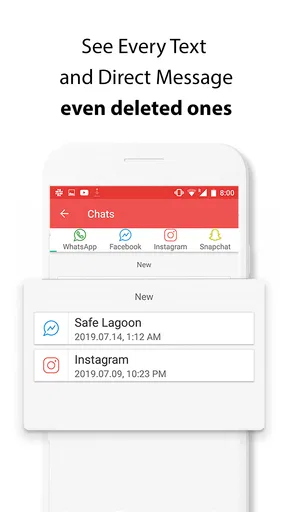
When a child begins using a phone more independently, the difficult part is not only deciding which apps are acceptable. It is keeping enough awareness to have useful conversations without turning every evening into an argument. That is the situation I had in mind while trying Safe Lagoon Parental Control, a free parenting app from Safe Lagoon designed to help parents stay aware of a child’s online activity and friends.
My overall impression is mixed but practical. The app has a clear purpose, supports a common family need, and can be useful when parents and children agree on the rules beforehand. At the same time, parental-control software is never a magic answer. Its value depends on how openly it is introduced, how consistently alerts are handled, and whether the family treats it as a safety tool rather than a replacement for trust.
Safe Lagoon belongs to the parenting category and is available for Everyone. It has been around since June 22, 2017, and its current version is 5.0.1111.sl.p. The app has passed half a million installs, with an average rating of 3.3 from roughly 5.9 thousand ratings and about 1.4 thousand written reviews. Those figures suggest an established product with a real user base, but also a service that may not feel equally smooth for every family.
From a worried parent to a workable daily routine
I would use this section to turn a general worry into a small, manageable routine: decide what needs attention, choose a calm time to review it, and agree on how to raise concerns without jumping to conclusions. That keeps the tool from becoming an all-day distraction and gives the child room to explain what a parent sees. Next, I’d look at how the app fits into the actual parent-and-child setup.
Starting with the family’s actual problem
I would not begin by installing this app simply because a child has received a first phone. I would begin with a specific concern: too much late-night activity, unfamiliar online contacts, difficulty knowing which conversations need attention, or a child who is not yet ready to manage digital boundaries alone. That distinction matters because the app works best when it supports a defined family plan.
Before setting anything up, I would explain what the parent wants to understand and why. A child who hears only “I am monitoring you” may focus on surveillance and try to work around it. A child who hears “we are using this while you learn to handle online situations” is more likely to understand the purpose. This conversation is not a feature of the software, but it is the first step in making the software useful.
The free price makes it easier to test the idea without committing money first. Safe Lagoon is also intended for broad family use rather than a narrow technical audience, and its Everyone age rating makes the app approachable from a store perspective. Still, parents should remember that an age rating describes the app’s suitability, not whether every monitoring decision is suitable for every household.
Worth Reading Before You Choose

EA SPORTS FC Mobile 26 Is a Bigger Football Game, but It Takes Time

Flipboard Shows What News Apps Must Do Beyond the Feed

Switching to Android Auto Means Rethinking Your Driving Routine

Google Calendar Makes a Crowded Week Easier to Manage

Ludo King Makes the Most of the Minutes Between Plans

Baby Panda World Brings Quick Play to Modern Phones, but Its Game Library Feels Busy
I would also decide in advance what counts as an urgent issue. Is the goal to notice possible contact with strangers, identify a pattern of unsafe behavior, or simply create a regular check-in routine? If every unusual event is treated as a crisis, the parent can quickly become exhausted and the child can feel constantly judged. A short list of priorities keeps the app from becoming a source of noise.
Setting up the parent and child sides
The practical workflow involves thinking about two people, not just one phone. The parent needs a way to review activity, while the child needs to use the device normally enough for the information to be meaningful. That handoff is where many parental-control tools become complicated: an installation that looks simple from the parent’s side can still create confusion on the child’s device.
I would set aside time when neither person is rushing out the door. The child should know which device is being connected, what kind of activity the parent expects to see, and how the family will discuss anything concerning. I would then check that the correct child profile and device are associated before relying on the app. A mistake at this stage can make later observations misleading.
One useful habit is to start with a short trial period focused on observation rather than punishment. For example, a parent might spend several days learning the normal pattern of online use before changing any household rule. That gives the family a baseline and prevents one isolated event from defining the child’s entire digital life.
I would also keep the child involved in the setup conversation. Even when a parent has the final responsibility, explaining the arrangement can reveal practical issues early: the child may use more than one device, share a device with a sibling, or need privacy for ordinary conversations. These details affect how confidently a parent can interpret what appears in the app.
Following the activity without drowning in it
Once the family routine begins, the most important skill is selective attention. The app’s central promise is awareness of online activity and friends, but awareness is not the same as reading every event with equal weight. I would use it as a prompt for questions, not as a daily scorecard.
A realistic weekday example might look like this: a child comes home, finishes homework, and uses the phone while a parent is preparing dinner. Later, the parent checks Safe Lagoon and notices activity involving an unfamiliar contact. Instead of immediately confiscating the phone, the parent asks who the person is and how they met. If the explanation is ordinary, the concern may end there. If the answer is evasive or the contact is pressuring the child, the parent has a concrete starting point for a safety discussion.
That workflow shows one of the app’s more valuable roles. It can help a parent notice a pattern that might otherwise remain invisible, especially when a child is embarrassed to raise the subject. But the app cannot supply the emotional context behind every interaction. A name can be unfamiliar without being dangerous, and a harmless conversation can look suspicious when viewed without context.
I would avoid checking constantly. A scheduled review, perhaps after school or during a weekly family conversation, is more sustainable than repeatedly refreshing the parent side. The exact schedule should match the child’s age and circumstances, but the principle is consistent: use the tool often enough to notice meaningful change, not so often that it replaces ordinary parenting.
Managing the handoff from alert to conversation
The handoff between digital information and real-world action is where my opinion of any parental-control app is decided. Safe Lagoon can help a parent know where to begin, but the parent still has to decide what to do next. That decision should be proportional to the situation.
For a mild concern, I would ask an open question first. “Can you tell me about this contact?” is more useful than “Why are you hiding this?” The aim is to learn whether the child recognizes the person, understands the privacy risk, and knows how to respond if the conversation becomes uncomfortable.
For a serious concern, the response needs to be faster and more direct. A parent may need to preserve relevant information, stop the conversation, involve another trusted adult, or seek appropriate professional help. The app can support awareness, but it should not be treated as an investigation platform or as proof that a child has done something wrong.
Another important handoff is between co-parents or other caregivers. If more than one adult is responsible for the child, they should agree on what the app is being used for and how they will communicate about concerns. Otherwise, one adult may react strongly while another has no idea what happened, leaving the child caught between inconsistent rules.
I also think children deserve a path to challenge an interpretation. If the parent misunderstands a contact or a pattern, the child should be able to explain it without the conversation becoming a trial. This is especially important for older children, whose friendships and group conversations can be complex even when nothing unsafe is happening.
What a successful routine looks like
The best outcome is not that a parent sees more screens. It is that the family develops better digital habits. Safe Lagoon can contribute to that outcome when it becomes part of a broader routine involving clear boundaries, regular conversations, and gradual independence.
For younger children, the parent may need closer involvement because online situations can be difficult to interpret. For teenagers, the app is more likely to work as a temporary safety net, with expectations reviewed as maturity grows. In both cases, the parent should explain how the level of oversight will change when the child demonstrates good judgment.
A practical result might be a child learning to recognize suspicious requests, avoid sharing personal information, and tell an adult when a conversation feels wrong. Those lessons are more durable than simply avoiding one specific contact. The app is most useful when it helps turn a digital event into a teachable moment.
There is also a benefit for parents who feel uncertain about where to start. Instead of relying only on vague warnings about the internet, they can use a real situation to discuss boundaries. That makes the conversation more concrete. However, I would still keep the child’s offline behavior and overall wellbeing in view. Online activity is only one part of a family’s safety picture.
Where the flow becomes uncomfortable
The first weakness is the unavoidable tension between protection and privacy. A child may accept monitoring at one age and resent it later. If the parent silently expands the level of oversight, the relationship can suffer even if the technical setup works perfectly. I would revisit the agreement as the child grows rather than assuming the original arrangement remains fair forever.
The second limitation is interpretation. A monitoring tool can show activity, but it cannot reliably tell a parent whether a friendship is healthy, whether a message was sarcastic, or whether a child is being excluded from a group. Parents who want a complete picture of emotional life will be disappointed if they expect the app to provide it.
There can also be practical friction around device changes, account details, and family arrangements. If a child uses several devices or a parent manages more than one child, careful labeling and regular checks become important. I would not assume that one successful setup means every later device or profile is automatically represented correctly.
Another trade-off is attention. Parents who already feel overwhelmed may find that monitoring creates another stream of information to process. In that situation, a simpler family agreement and built-in device wellbeing tools may be a better starting point. Safe Lagoon makes more sense when the parent is willing to review information thoughtfully rather than collect it passively.
How it compares with ordinary alternatives
The usual alternative is to rely on the phone’s own family settings, screen-time controls, and conversations at home. Those tools can be enough when the main issue is bedtime use, app installation, or time spent on the device. They often feel less intrusive because they focus on general limits rather than the child’s social activity.
Safe Lagoon is more relevant when the parent’s concern includes online contacts and the child’s wider digital interactions. That focus can provide a different kind of awareness from a simple daily usage total. In exchange, it requires more judgment and more careful communication, because social activity is harder to interpret than a number of hours on a screen.
Another alternative is manual checking together with the child. I prefer that approach when the child is old enough to participate honestly and the family already has strong communication. It offers context immediately and can teach the child how to make decisions. The disadvantage is that a child may not volunteer a problem, while a monitoring app can at least give a parent a reason to ask.
For families seeking strict technical lockdown, this may not be the right first choice. A more restrictive device-management solution may fit better when the child is very young or when the main requirement is blocking access. Safe Lagoon is better suited to families trying to stay informed about online activity while keeping a conversation open.
Who should use it, and who should pass
I would recommend trying it for parents who need a clearer view of a child’s online world, especially when the family is willing to establish transparent rules. It may also help a parent who notices a change in behavior but does not know how to begin a calm conversation. The free price lowers the barrier to testing whether this style of oversight fits the household.
I would be cautious if the parent expects the app to prevent every risk, identify intent automatically, or remove the need for trust. I would also skip it if monitoring would be used mainly to punish ordinary independence. In that situation, the technology could intensify conflict rather than improve safety.
Before relying on it, I would make sure the child understands the arrangement, the parent knows what questions to ask, and the adults in the household agree on how to respond. I would then review whether the app is producing useful conversations or merely increasing anxiety. That simple test is more important than any installation figure or store rating.
My final take after following the full workflow
Safe Lagoon Parental Control is a focused parenting app with a sensible role: helping a parent stay aware of a child’s online activity and friends so that concerns can be discussed earlier. Safe Lagoon has built a product that can be useful in the space between complete freedom and heavy-handed restriction, but that middle ground requires maturity from the parent as well as the child.
I like the idea of using it as a temporary support system, with the level of oversight adjusted as the child learns. I am less convinced by the idea of treating it as a permanent window into every digital interaction. Its strongest result comes when information leads to a calm question, a practical lesson, or a timely safety decision.
With more than half a million installs and a 3.3 average rating, it is established enough to consider, while the middling rating is a useful reminder to keep expectations realistic. I would try the free app when the family has a specific concern and a clear plan for using what it reveals. If the real need is only screen-time scheduling or simple app blocking, the phone’s built-in controls may be less complicated. If the need is informed involvement in a child’s online social life, this app is worth testing carefully and openly.
Pros
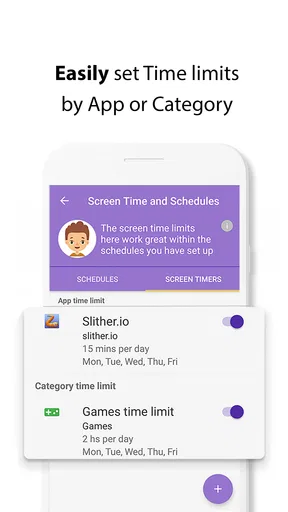
- Clear screen-time limits and app-blocking controls
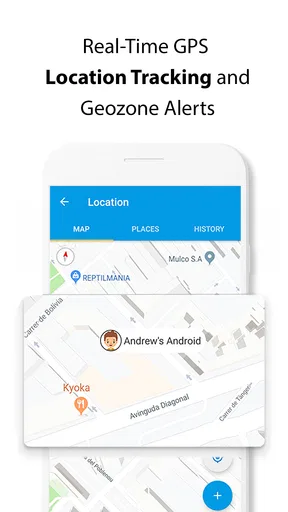
- Location sharing helps parents check a child’s whereabouts
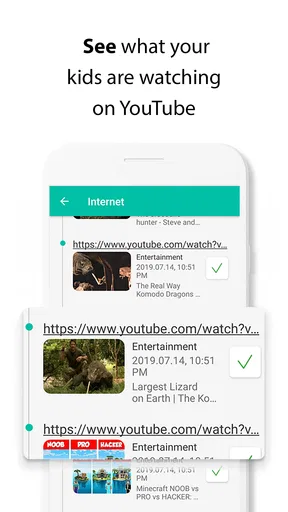
- Web filtering can reduce access to unsuitable online content
- Parents can manage multiple children from one account
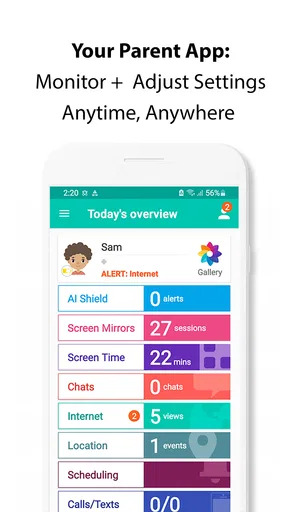
- Activity reports make digital habits easier to understand
Cons
- Some advanced controls may require a paid subscription
- Children may need the app installed and permissions enabled
- Location tracking can affect battery life and mobile data use
- Setup may feel complicated for families with several devices
- Privacy concerns may arise from extensive monitoring features
FAQs for Safe Lagoon Parental Control
What is Safe Lagoon Parental Control and what can parents use it for?
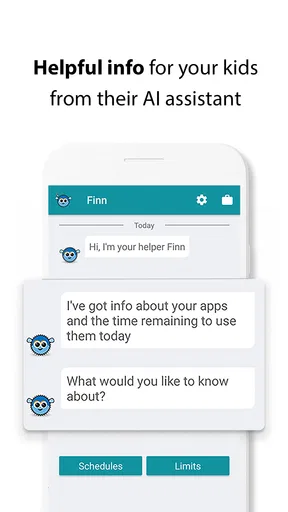
Safe Lagoon Parental Control is designed to help parents supervise and manage a child’s digital activity from a connected device. Depending on the child’s phone, operating system, and enabled permissions, parents may be able to review app usage, set screen-time limits, filter web content, monitor location, and receive safety alerts. Its usefulness depends on correct setup and the features supported on each device.
Does Safe Lagoon Parental Control work on both Android and iPhone?
Safe Lagoon supports parental-control features across mobile platforms, but the exact tools can differ between Android and iOS. Android generally allows deeper device-management controls, while Apple’s system may restrict certain monitoring and blocking functions. Before installing, check the current store listing and compatibility requirements for both the parent and child devices, including supported operating-system versions.
What permissions does Safe Lagoon require, and should I be concerned about privacy?
To provide monitoring and safety features, Safe Lagoon may request permissions such as location access, usage access, notifications, accessibility or device-management privileges, and account information. These permissions can be sensitive, so parents should read the privacy policy, understand what data is collected and shared, and explain the setup to older children. Only enable features that are genuinely needed.
Can Safe Lagoon block apps, websites, and limit screen time?
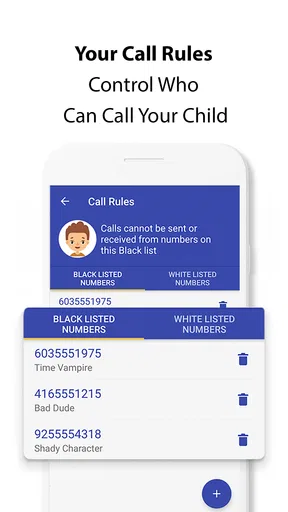
The application is intended to give parents tools for managing a child’s digital routine, including screen-time schedules and restrictions on selected apps or online content. However, the available controls can vary by platform, subscription plan, device manufacturer, and permission settings. Parents should test the rules after configuration, because restrictions may not work correctly if the child disables permissions or uses another device.
Is Safe Lagoon Parental Control free, and is it difficult to set up?
Safe Lagoon may offer basic functionality at no cost while reserving advanced monitoring, reporting, or management options for a paid plan. Pricing and included features can change, so review the latest information in the official app store before subscribing. Setup usually involves installing the parent and child components, creating or linking accounts, granting permissions, and configuring rules for each child.


